
A custom subdomain makes it easier for players to join your server without needing to remember a long IP address.
Instead of sharing something like:
12.34.56.78:25550
You can share something clean and simple like:
myserver.kiwinode.nz
This guide explains how custom subdomains work and how to set one up with KiwiNode.
What is a Custom Subdomain?
A custom subdomain is a friendly server address that points to your game server automatically.
It works just like a normal IP, but it’s much easier to remember and share.
Examples:
survival.kiwinode.nzplaywithfriends.kiwinode.nzmyserver.kiwinode.nz
Do I Need a Custom Subdomain?
No - your server will always work with the default IP address.
But a subdomain is great if you want:
A cleaner join address
A more professional-looking server
Something easier for players to type
How to Request a KiwiNode Subdomain
KiwiNode subdomains are set up automatically within our control panel.
To create one:
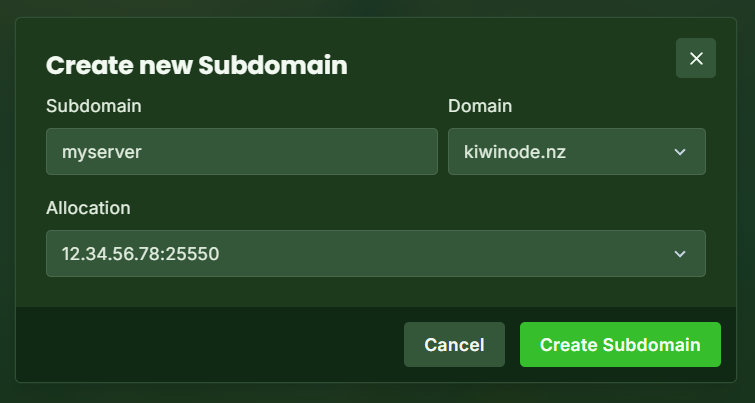
Head to the Subdomains tab in the side bar
Enter the subdomain you want
Examplemyserver.kiwinode.nzPick which allocation you want the subdomain pointed to
(In most cases this can be left as the pre-selected option)Create your subdomain
Once It’s Set Up
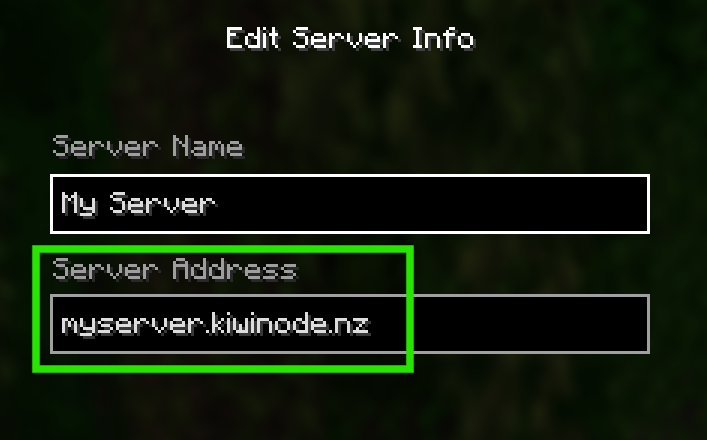
After your subdomain is active, players can join using it immediately in-game.
Just enter it the same way as an IP:
myserver.kiwinode.nz
Important Notes
Subdomains only work while the server remains active
Each plan comes with three subdomain allocations, meaning if you split your server you can only have three subdomains in total (unless otherwise arranged)
Names must be appropriate and available (our staff team may remove inappropriate subdomains from your server and remove your access to the manager)
If your server IP changes, you will need to edit your subdomain and change the allocation it's assigned to for it to update
Need Help?
If you're unsure what to pick or want to change your subdomain later, just contact support and we’ll help out.
📌 Related Articles: